New 'The Angry Birds Movie' Trailer Released!
Australian 9Jumpin Becomes 9Now on App Store

The Australian Television Channel 9 app has gotten an upgrade and a new name today. 9Jumpin is now 9Now.
9Now is a online live streaming and on-demand app. You can watch Channel 9 live, or catch up on shows after they are aired. You can access 9Now from your phone, tablet, computer, or TV.
So you can watch a range of shows on-demand, and Channel 9 live, with other Channel 9 networks like 9Go and 9Life coming soon.
The video quality seems good and adjusts with your internets connection speed. Note, you may want to make sure you switch on the option "Play on WiFi Only" in the settings, unless you have an awesome mobile data plan.
Now the downsides of the app. To watch anything, you'll need to create an account with 9Now. Also, there is no AirPlay option. And there are advertisements, of course, but that's to be expected, however unlike a recording on a DVR, you can't skip these ads. Other than that, the app seems okay so far.
The 9Now app is FREE to download for iOS (iPhone & iPad) and Android. You can also access 9Now from the web at https://www.9now.com.au
Fix Apple Watch Digital Touch Taps & Drawings Not Sending
 |
| Image credit: Apple, Inc. |
Open the 'Settings' app on your iPhone > then scroll down to and tap 'Messages' > then toggle off 'iMessage' > then switch 'iMessage' back on (after a few seconds). The re-activation of iMessage seems to fix the problem and then may even send all your recent failed digital touch messages through.
Best Instagram App For iPad - Flow for Instagram - App Review

It's 2016 and can you believe that Instagram still doesn't have an app for the iPad?! They seem to be focused on mobile only � but the iPad does make for a great viewing platform. But it doesn't matter, because if all you want to do is view photos and videos from Instagram on your iPad, there is a great third-party-app available.
'Flow for Instagram' by Codegent Bangkok, is what the iPad app of Instagram should be. Works in both landscape and portrait, Flow features Instagram pictures nicely laid out in a scrollable grid.
Tap a picture to enlarge and show other details that you'd expect like likes and comments. You can even zoom in on pictures by pinching and share, send, or even save to your camera roll* (requires paid version of app).
The main layout of Flow features buttons for:
- Home: the photos and videos from who you follow.
- Your Likes: the pics/videos you've liked.
- Favorites: your bookmarked users, tags, and places.
- Suggested/top pics: like the explore posts on Instagram.
- And Search: where you can search for users, tags, and places.
You also have easy access to other Instagram features like viewing complete pages of who you are following, your followers, requests, search, etc...
In the upgraded paid version (Flow+) you can choose between a light or dark theme for the app. *comes with dark theme - must upgrade for light theme. Also add multiple accounts, hide users posts, get a extended home feed, save pictures and videos and more.
Because this is a third-party-app, you cannot upload images from to Instagram from Flow. But, this app does makes for a great way to view your Instagram feed on your iPad.
Flow for Instagram is available to download for free (with a paid "Plus+" version available through in-app purchase) for iPhone and iPad - from the App Store.
27 Celebrities On Snapchat That You Can Follow

Snapchat, that popular photo and video sharing app with millennials and I'd say mostly the iGen(eration). But did you know celebrities use the app too? Here is our picks of celebrities that you can follow the story of � on Snapchat:
Ariana Grande
Singer and actress.
Username: moonlightbae
Ashley Benson
Actress. You may know her from TV show, Pretty Little Liars.
Username: benzo33
Chris Hardwick
Television host. Currently hosts @midnight on Comedy Central.
Username: chrishardwick
Ciara Hanna
Actress & model. Portrayed the Yellow Ranger on Power Rangers Megaforce/ Super Megaforce. More recently played Heather Locklear on The Unauthorized Melrose Place Story.
Username: ciarahanna20
iJustine
You know her as an Apple fan who makes YouTube videos.
Username: ijustine
Sara Underwood
Model and actress, who was the 2007 Playboy Playmate of the Year.
Username: sjunderwood
Taylor Hill
Model and current Victoria's Secret Angel.
Username: taylor_hill
Rihanna
Singer.
Username: rihanna
Hailee Steinfeld
Actress, model and singer.
Username: haiz
Victoria Justice
Actress and singer.
Username: victoriajustice
Zendaya
Singer.
Username: zendaya_96
Mike Shinoda
Musician, rapper, singer... You know him from Linkin Park or Fort Minor.
Username: mikeshinodalive
Blake Lively
Actress and Model. Portrayed Serena van der Woodsen in CW's Gossip Girl.
Username: LivelyBK
Kylie Jenner
Reality television personality.
Username: kylizzlemynizzl
Nick Jonas
Singer/Actor. One of the Jonas Brothers.
Username: JickNonas
Joe Jonas
Singer/Actor. One of the Jonas Brothers.
Username: joseadam
Jessica Alba
Actress, model and businesswoman.
Username: jessicamalba
Justin Bieber
Singer.
Username: rickthesizzler
Bella Thorne
Actress, singer and model.
Username: BellaThorneDABBecky G
Singer and Actress.
Username: BeckyGofficial
Jennifer Lopez
Singer, actress, among many other things.
Username: jlobts
Ryan Seacrest
Radio personality, Television host and Producer.
Username: ryanseacrest
Selena Gomez
Actress and singer.
Username: selenagomez
Miley Cyrus
Singer and actress.
Username: MileyCyrus
Niykee Heaton
Singer.
Username: niykeeheaton
Ed Sheeran
Singer and musician.
Username: teddysdaytoday
Ellen DeGeneres
Television host / comedian.
Username: ellen
*We have tried to confirm all the accounts on this list with a verified source, however we can not guarantee their authenticity.
Who's your favorite celebrity to follow on Snapchat? Add their name and handle in the comments!
Snapchat is a free to download app (with in-app purchases available) designed for iPhone and Android � available on the iTunes App Store and Google Play.
20 Celebrities To Follow On Instagram (Part 4)
Chloe Bennet
Username: chloebennet
Chris Hardwick
Username: hardwick
Username: CMoretz
Chris Hemsworth
Username: chrishemsworth
Megan Fox
Username: the_native_tiger
20 Celebrities To Follow On Instagram (Part 3)
Nicola Peltz
Username: nicolaannepeltz
Grant Gustin
Username: grantgust
Username: jenhawkins_
Emma Roberts
Username: EmmaRoberts6
Nathan Fillion
Username: natefillion
20 Celebrities To Follow On Instagram (Part 2)
Kendall Jenner
Username: kendalljenner
Robert Downey Jr.
Username: robertdowneyjr
Username: katyperry
Miley Cyrus
Username: mileycyrus
Ariana Grande
Username: arianagrande
20 Celebrities To Follow On Instagram
Daisy Ridley
Username: daisyridley
Username: taylorswift
Rihanna
Username: badgalriri
Melissa Benoist
Username: melissabenoist
Jennifer Lopez
Username: jlo
Apple's iOS Autocorrect Suggests "Kardashian" for "Lardass"

Apple has a little hidden Easter egg joke in iOS apart of autocorrect.
Seen by actress & fashion model, Lydia Hearst and Instagramed by television host Chris Hardwick, when first typing in the word "Lardass", the iOS autocorrect suggests the replacement word, "Kardashian".
I tried it out for myself - and yep - this is real! Not that I'd doubt Chris Hardwick or Lydia Hearst. However after typing the word "Lardass" the "Kardashian" suggestion doesn't appear anymore. It may be a one off joke.
Try it out for yourself!
Apple Releases iOS 9.2 Update With Improvements & Bug Fixes

Apple has today released iOS 9.2 update for iPhone's, iPad's... Included in this update is various improvements and bug fixes including: improvements for Apple Music, a new Top Stories in News, and Mail Drop in Mail for large attachments.
Before updating, remember to backup your iOS device to iTunes or at least iCloud! Then you can update over-the-air on Wi-Fi by going to: Setting > General > Software Update on your iOS device. Or you can also update through iTunes with your device connected to your computer.
'Power Rangers Dash' Adds Megaforce Rangers To Game

Here's a tip to collect the new Megaforce Rangers - go the the store and buy with "Purchase by Point" for 100P each - then when asked which season you'd like the Ranger from, choose 'Megaforce'.
Power Rangers Dash now features nine different seasons of Power Rangers, including; Mighty Morphin (minus the White Tiger Ranger), Wild Force, S.P.D., Mystic Force, Operation Overdrive, RPM, Samurai, and the latest team, Power Rangers Dino Charge. Here's still hoping they add some of the other classic seasons like; Dino Thunder, Zeo, Time Force, and In Space - to name a few.
Power Rangers Dash now features nine different seasons of Power Rangers, including; Mighty Morphin (minus the White Tiger Ranger), Wild Force, S.P.D., Mystic Force, Operation Overdrive, RPM, Samurai, and the latest team, Power Rangers Dino Charge. Here's still hoping they add some of the other classic seasons like; Dino Thunder, Zeo, Time Force, and In Space - to name a few.
Power Rangers Dash is FREE to download from the iOS App Store and Android Google Play Store.
Pocket Weather AU for iOS Gets Disappointing Redesign Plus Apple Watch App

Pocket Weather Australia by ShiftyJelly PTY LTD has long been a favorite weather app for Australians. It was just recently updated with a totally new redesign, along with the new much anticipated Apple Watch app. But wait! Users who haven't updated yet, may not want to hit that button too quickly. This update has left some users not too happy with the change and for what I think is good reasons.
If you use Pocket Weather Australia, you'll know the app for its great design and more accurate weather information (than the stock iOS app) - right down to your local suburb. The app was designed for both iPhone and iPad, and used the real-estate advantages. The same can't be said for all of its previous positives in this latest update.
Gone is the great graphical weather images for a very minimal design, with a lot of white space and very basic weather icons. The new design also feels less intuitive - even with its very simple Google looking card system. Like tapping the today section card will open more in-depth information, however there is no indicator of this feature. There are also inconsistencies that don't make a lot of sense - like rounded up/down weather temperatures and showing the 'correct value' in different areas. I also experienced crashes and freezing while performing simple actions like adding a city or trying to load the weather.The iPad app is also a let down compared to its previous version. Before the iPad made use of the larger display, however now, it's basically the same exact iPhone app on a larger plain background. It's clear that this redesigned version has taken design cues from Google, over Apple.
On thing that many people were waiting for was a Apple Watch app to replace the usually incorrect iOS weather app. But this app has its let downs too. While there is a complication you can add to the Watch face, it will not show the current live temperature - instead it'll show the days max and condition. Tapping the complication will take you to the Pocket Weather Australia Apple Watch app.
The Watch app shows some more useful information for when you're on the go, like; current temperature, the day's predicted high and low, and the weeks temperature overview. Missing info that would be useful is; the Feels Like temperature, hourly/upcoming rain info, ability to switch through different cities/towns and a reload button for when the app fails to refresh, which in my experience, happens - there has definitely been some updating issues.
While it's still the same great app that pulls weather information from the Bureau of Meteorology, maybe with a few issues or bugs, this version feels a lot like a step backwards. Honestly, a hybrid of the before and after, I think, would look a lot better. Bring back the old weather graphics for the header, keep the simple new interface maybe with some adjustments and make better use of the iPad's larger screen size.
Pocket Weather Australia is priced at AU$2.99 in the App Store. The new redesign and Apple Watch app update is free for existing users.
Surreal 3D Exploration Game 'Monument Valley' Currently FREE On App Store

Monument Valley, down from it's usual price of $3.99, features stunningly beautiful hand-crafted graphics in it's 3D surreal world.
The goal is to guide princess Ida though the mysterious monuments, while uncovering hidden paths, optical illusions, and outsmarting the Crow People.
Monument Valley is also Apple's 2014 Game of the Year, and Winner of Apple's 2014 Design Award.
Advent Calendar for iOS - 2015 Christmas Apps
It's December and Christmas is just around the corner! Which means - it's time for Christmas apps! What better way to start the countdown than with an advent calendar app!

An advent calendar is a countdown calendar with doors that you open - one-each-day. Most commonly, physical advent calendars features a gift, mostly chocolate, inside. In an iOS modern fashion - 25 Days of Christmas - features digital gifts.
In 25 Days of Christmas, you get a quick mini-game to play each day and a special 'gift', which seems to basically be an advertisement for an app that's available for free on the App Store.
The simple mini-games are anything Christmas themed from snowball fights with elves, to breaking and eating a Christmas cookie, to decorating Christmas trees.
25 Days of Christmas - Holiday Advent Calendar 2015 is designed for both iPhone and iPad and is available for FREE on the App Store. [View on App Store]
25 Days of Christmas - Holiday Advent Calendar 2015
By appChocolate
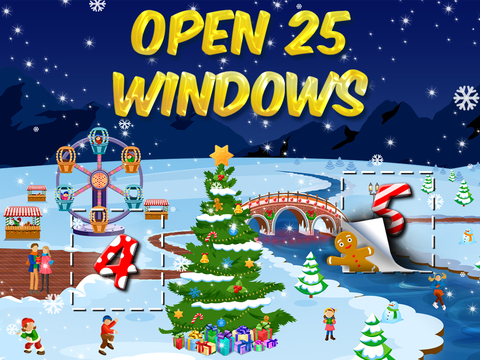
An advent calendar is a countdown calendar with doors that you open - one-each-day. Most commonly, physical advent calendars features a gift, mostly chocolate, inside. In an iOS modern fashion - 25 Days of Christmas - features digital gifts.
In 25 Days of Christmas, you get a quick mini-game to play each day and a special 'gift', which seems to basically be an advertisement for an app that's available for free on the App Store.
The simple mini-games are anything Christmas themed from snowball fights with elves, to breaking and eating a Christmas cookie, to decorating Christmas trees.
25 Days of Christmas - Holiday Advent Calendar 2015 is designed for both iPhone and iPad and is available for FREE on the App Store. [View on App Store]
Subscribe to:
Posts (Atom)
Featured Post
How To Update Your iPhone and iPad to iOS 10
iOS 10 is here! Here is how to update your device and get all those new features! The first things you'll want to do before upda...


![12 Best Apps For Apple Watch: Essential Apps To Install [Part 1]](https://blogger.googleusercontent.com/img/b/R29vZ2xl/AVvXsEjrCVk1bWpxz38tGFpPMBnMP7KMIgqtsb7Ed6f7KYwyDJOI1c7O35mJ4VV4T1YYlJr5LoYpzxqulbA1SoBTSQ8vIUb4dUBPmkccEgK_6STk-Kzr7qw33ANNDrPeX7K1FqXse8ZiXf949gbg/s72-c/Twitter+Apple+Watch.jpeg)


Follow Us
Were this world an endless plain, and by sailing eastward we could for ever reach new distances