Showing posts with label TV. Show all posts

Find Pok�mon in 'Pok�mon GO' With This Realtime Map App


If you've been hunting for Pok�mon in the real world with the new hugely popular app, 'Pok�mon GO' for iOS and Android, you'll know how frustrating it can be to locate the nearby ones around you.
Referred by some as the 'three step bug', sometimes Pok�mon are shown on the nearby map, that simply aren't even there. 

Thanks to Pok�mon GO's API, there are now websites and apps that can help you find the exact locations of the little Pocket Monsters! 

Available on iOS and Android, PokeWhere by Vylar will become your must have Pok�mon GO companion app.

"PokeWhere is a Pokemon finder for the mobile game Pokemon Go that uses the most advanced API to give you the most accurate real time info about the Pokemon near you. The real time info is then displayed to you on the map with the exact locations of the Pokemon that have spawned near you. With PokeWhere you will never miss a beat and catch all the Pokemons.
PokeWhere is very simple to use all you have to do is press the my location button, which will bring you to where you are on the map and the Pokemons around you will show up, that's all. It will refresh as you walk. Now all you have to do now is start catching them all, it is as simple as that!" 

This app does work! It's NOT some user submitted app and because PokeWhere is in real-time, you'll know that the Pok�mon are actually there to be caught! You can even move the map around, re-pin, and do some location scouting. 

While this app is a must have for all Pok�mon Trainers, unfortunately it doesn't have the ability to search for particular Pok�mon and show you there closest location. That would be a great useful feature that hopefully someone can create. But in the meantime, download PokeWhere and find the Pok�mon near you! 

> PokeWhere is FREE to download - available for iPhone and Android phones. 

UPDATE: The company behind the game, Niantic, has disabled the ability for these live radar trackers to work. Unfortunately this app and others alike, do not work anymore.  


Got an iOS or MacOS question that you want answered? Follow and tweet me on Twitter and your question just might get answered on this site! And maybe on Twitter, too.  


How To Evolve Pokemon in 'Pokemon GO' on iOS and Android


To evolve a Pokemon in 'Pokemon Go' you need a certain amount of 'Candy' for that particular Pokemon. You can obtain more candy by catching the same Pokemon (or one of its other evolutions) multiple times. When you have enough candy, tap the "evolve" button. 


'Pok�mon GO' Available In App Store First Look and Walkthrough

Pok�mon GO, the much anticipated virtual reality GPS game by Niantic, Inc. is now available to download in select countries (including; Australia and New Zealand) from the App Store and Google Play Store! U.S. Players, hang on!

Pok�mon GO is the game that'll actually make you get up and move around, if you want to play. I know, doesn't really sound like their target audience, am I right? The game uses your GPS location to track your position and place certain Pok�mon and other locations that you'll be familiar with from the games the TV series; like a Pok� Gym or Pok� Shop, around you in various nearby locations.

In the game, you'll be able to catch Pok�mon, evolve Pok�mon, hatch eggs, take on Gym battles, and much more...

Here is a quick first look walk-through of setting up 'Pok�mon GO' for the first time! 


The first thing you'll be presented with is a sign up page! The only way you can sign up is with a Google account.

Next, the game tells you to "...be alert at all times." And to be aware of your surroundings. You know, because you'll never know where they'll place that rare Pok�mon ...it could be in your neighbors house, in the middle of the ocean, or some other location that you'd need to trespass on.

Then you are presented with the almighty Terms and Conditions! There is also a little check box asking permission to send you emails about the game.

After accepting the Terms and Conditions, the game introduction begins!


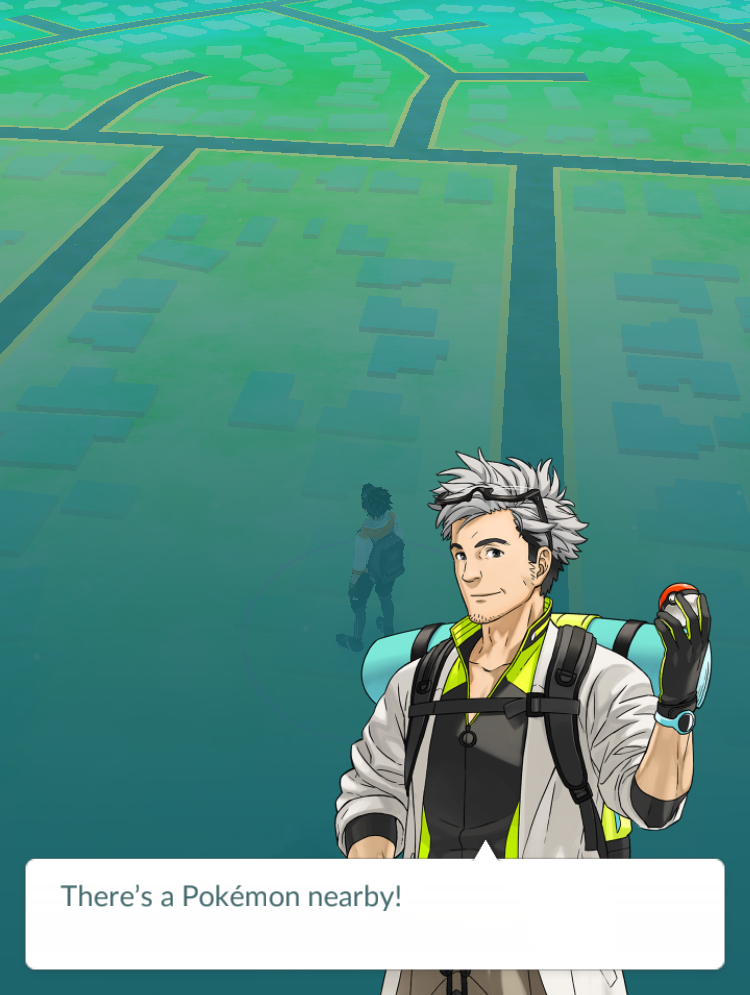
We meet Professor Willow, an old guy with really good hair for his age, who tells you that the world is inhabited with creatures known as Pok�mon ...that only your smartphone camera can see. Professor Willow then asks you for your help in his research, but it's really more of a rhetorical question, because you can't say "no!".

Your mission; find and collect Pok�mon from everywhere!


Next up, it's time to create your character! You can choose whether "your style" is either a male or female. Which is lucky, because I am one of those.


Then, it's time to customize your avatar! You can customize your skin, hair, and eye color. Then customize your clothing. While there isn't a lot of item choices, you can pick and choose from a few different color options.


Once done customizing your character, it's time to catch your first Pok�mon! Professor Willow gives you your first lot of Pok� Balls to help you catch one.


Right nearby, luckily there is three Pok�mon to choose from. A Charmander, a Bulbasaur and the best one of course, Squirtle. The game will then ask you to give it permission to access your camera, so it can show you your surroundings through your phones screen. You can switch this off at anytime.


Now it's time to catch your first Pok�mon! Just swipe the Pok� Ball on the screen to your target and wait for the ball to seal the deal.


After catching the Pok�mon you get a few stats.


Now, after catching a Pok�mon, Professor Willow asks you something he really should of asked you a lot earlier - your name. Kind of rude, but anyway. Now you'll go through the painful process of picking a username that hasn't already be taken!


Time to Walk! The game tells you that to move your avatar, you'll need to walk / move around in the real world!


Now is the moment when you realize that this is as far as you can really go with this game, without going for a drive or a long walk...

Well that's the set up process for Pok�mon GO! To play the game you will need to move around a lot! I don't know if this game would be great for kids - while it's great because it make you get up and move, it'll make them go to various locations and they'll either try alone, which you wouldn't want, or nag their parents to take them for a drive to who knows where! For adults who grew up with the original Pok�mon games and TV series - you can now quit your job and travel the world to become that Pok�Master that you've always dreamed of becoming!

Have you downloaded the game, yet? Let me know what you think of Pok�mon GO, in the comments!

Pok�mon GO is available to download for FREE (with in-app purchases available) from the App Store.

-> Download Pok�mon GO from the App Store


'Futurama: Game Of Drones' Now Available on App Store & Google Play

Good news everyone! Futurama is back ...as a game on Android and iOS!


Now available in the App Store and Google Play store, Futurama Game of Drones sees the Planet Express crew back in action,  this time delivering drones in a match-4 style game.

Much like other match type games like Candy Crush, Bejeweled, etc... In Futurama: Game of Drones, you have different colored drones to match in a minimum of 4, matching a required number of certain colors to move onto the next stage.

As added extras, there is also power ups, and special items added in the grid for bigger matching effects.

As the story progresses, you can also play with your favorite characters from the TV Show, including; Fry, Bender, Leela, Amy, Zapp, and the Professor.

But the most fun and best parts, to me, of this game are the story cut scene animated comics and 3D world menus.

To get a better idea of the game play, check out the game trailer below.


Pok�mon's Super Bowl Commercial


Pok�mon is celebrating 20 years! And to celebrate, they even have their own Pok�mon Super Bowl spot! Check out the ad 'Train On' above.

Pok�mon is also expected to release a new game for mobile on iOS and Android, later this year, titled, Pok�mon GO - which will be a virtual reality game, that'll place Pok�mon in 'the wild', for everyone to battle, catch, and trade. More details about Pok�mon GO is expected to be released this March at GDC 2016.

Check out the official Pokemon20.com site for more.


Australian 9Jumpin Becomes 9Now on App Store


The Australian Television Channel 9 app has gotten an upgrade and a new name today. 9Jumpin is now 9Now.

9Now is a online live streaming and on-demand app. You can watch Channel 9 live, or catch up on shows after they are aired.  You can access 9Now from your phone, tablet, computer, or TV.

So you can watch a range of shows on-demand, and Channel 9 live, with other Channel 9 networks like 9Go and 9Life coming soon.

The video quality seems good and adjusts with your internets connection speed. Note, you may want to make sure you switch on the option "Play on WiFi Only" in the settings, unless you have an awesome mobile data plan.

Now the downsides of the app. To watch anything, you'll need to create an account with 9Now. Also, there is no AirPlay option. And there are advertisements, of course, but that's to be expected, however unlike a recording on a DVR, you can't skip these ads. Other than that, the app seems okay so far.

The 9Now app is FREE to download for iOS (iPhone & iPad) and Android. You can also access 9Now from the web at https://www.9now.com.au


27 Celebrities On Snapchat That You Can Follow


Snapchat, that popular photo and video sharing app with millennials and I'd say mostly the iGen(eration). But did you know celebrities use the app too? Here is our picks of celebrities that you can follow the story of � on Snapchat:  

Ariana Grande 
Singer and actress. 
Username: moonlightbae

Ashley Benson
Actress. You may know her from TV show, Pretty Little Liars. 
Username: benzo33

Chris Hardwick
Television host. Currently hosts @midnight on Comedy Central. 
Username: chrishardwick

Ciara Hanna
Actress & model. Portrayed the Yellow Ranger on Power Rangers Megaforce/ Super Megaforce. More recently played Heather Locklear on The Unauthorized Melrose Place Story. 
Username: ciarahanna20

iJustine 
You know her as an Apple fan who makes YouTube videos. 
Username: ijustine


Sara Underwood
Model and actress, who was the 2007 Playboy Playmate of the Year. 
Username: sjunderwood

Taylor Hill
Model and current Victoria's Secret Angel. 
Username: taylor_hill

Rihanna
Singer.
Username: rihanna

Hailee Steinfeld
Actress, model and singer. 
Username: haiz

Victoria Justice
Actress and singer. 
Username: victoriajustice

Zendaya
Singer. 
Username: zendaya_96

Mike Shinoda
Musician, rapper, singer... You know him from Linkin Park or Fort Minor. 
Username: mikeshinodalive

Blake Lively
Actress and Model. Portrayed Serena van der Woodsen in CW's Gossip Girl. 
Username: LivelyBK

Kylie Jenner
Reality television personality. 
Username: kylizzlemynizzl

Nick Jonas
Singer/Actor. One of the Jonas Brothers. 
Username: JickNonas

Joe Jonas 
Singer/Actor. One of the Jonas Brothers. 
Username: joseadam

Jessica Alba 
Actress, model and businesswoman. 
Username: jessicamalba

Justin Bieber
Singer. 
Username: rickthesizzler

Bella Thorne
Actress, singer and model. 
Username: BellaThorneDAB

Becky G
Singer and Actress. 
Username: BeckyGofficial

Jennifer Lopez
Singer, actress, among many other things. 
Username: jlobts

Ryan Seacrest 
Radio personality, Television host and Producer. 
Username: ryanseacrest

Selena Gomez
Actress and singer.
Username: selenagomez

Miley Cyrus
Singer and actress. 
Username: MileyCyrus

Niykee Heaton
Singer. 
Username: niykeeheaton

Ed Sheeran
Singer and musician.  
Username: teddysdaytoday

Ellen DeGeneres
Television host / comedian. 
Username: ellen


*We have tried to confirm all the accounts on this list with a verified source, however we can not guarantee their authenticity.  


Who's your favorite celebrity to follow on Snapchat? Add their name and handle in the comments!  


Snapchat is a free to download app (with in-app purchases available) designed for iPhone and Android � available on the iTunes App Store and Google Play.  


20 Celebrities To Follow On Instagram (Part 4)

A photo posted by Chloe Bennet (@chloebennet) on


Chloe Bennet
Username: chloebennet

Chris Hardwick
Username: hardwick

Chloe Moretz
Username: CMoretz

Chris Hemsworth
Username: chrishemsworth

Megan Fox
Username: the_native_tiger


20 Celebrities To Follow On Instagram (Part 3)


Nicola Peltz
Username: nicolaannepeltz

Grant Gustin
Username: grantgust

Jennifer Hawkins
Username: jenhawkins_

Emma Roberts
Username: EmmaRoberts6 

Nathan Fillion
Username: natefillion


20 Celebrities To Follow On Instagram (Part 2)


Kendall Jenner
Username: kendalljenner

Robert Downey Jr. 
Username: robertdowneyjr

Katy Perry
Username: katyperry

Miley Cyrus
Username: mileycyrus

Ariana Grande
Username: arianagrande


20 Celebrities To Follow On Instagram

A photo posted by @daisyridley on


Daisy Ridley
Username: daisyridley

Taylor Swift
Username: taylorswift

Rihanna
Username: badgalriri

Melissa Benoist 
Username: melissabenoist

Jennifer Lopez
Username: jlo


'Power Rangers Dash' Adds Megaforce Rangers To Game


If you had finished collecting Power Rangers in the iOS and Android game, 'Saban's Power Rangers Dash', you now have a few more to go back in and collect. In a recent update, the game has added the six 'Power Rangers Megaforce' Rangers!

Here's a tip to collect the new Megaforce Rangers - go the the store and buy with "Purchase by Point" for 100P each - then when asked which season you'd like the Ranger from, choose 'Megaforce'.

Power Rangers Dash now features nine different seasons of Power Rangers, including; Mighty Morphin (minus the White Tiger Ranger), Wild Force, S.P.D., Mystic Force, Operation Overdrive, RPM, Samurai, and the latest team, Power Rangers Dino Charge. Here's still hoping they add some of the other classic seasons like; Dino Thunder, Zeo, Time Force, and In Space - to name a few.  

Power Rangers Dash is FREE to download from the iOS App Store and Android Google Play Store. 


Australian TV Apps on iOS - Review (Part 1)


Australians, free television networks are making watching your favorite shows easier and more convenient for you. We now have more content online than ever before and if you have an iPhone, iPad, or computer, it's never been easier to catch up on TV in your own time. 

All major Australian television networks have iOS apps available. The Seven Network has Plus7, Channel 9 has 9jumpin, Network Ten has Tenplay, there is also SBS On DemandABC iview and ABC KIDS iview

But how do all these apps really perform? Are they worthy of even being on your iOS device? Will you have a great experience? And can I steam the video to my Apple TV? These are the main questions that I'll be answering in these reviews. 

Reviewing these apps, I'll be looking to for the following criteria: picture and sound quality. General features and user interface. The catalog of available shows to watch. How advertising effects the watch-ability and if the app supports AirPlay streaming to a Apple TV. 

Also note, these reviews are based on playback on a iPhone 6 and streaming to a 2014 Apple TV (not the newest one). These networks also have websites available where you can access many, if not all, of the same features. 


Picture and sound quality: Picture was ok, clear, but far from a HD clear image. Sound was ok for watching on a iPhone or iPad. 

Noteworthy Feature: Plus7 has recently added new live streaming of their three main channels to the app. You can live stream Channel 7, 7two, and 7mate. 

Show catalog: 7Plus features heaps of there shows, including: A Touch of Frost, Beach Cops, Better Homes and Gardens, Blindspot, Castle, Grimm, Heroes Reborn, Home and Away, How to Get Away with Murder, The Blacklist, The Chase, and many more... 

Ads: Yes. The 'hour long' episode that I watched featured seven commercial breaks. Commercial breaks featured multiple ads.  

AirPlay support?: No. 


9Jumpin

Picture and sound quality: Quality improves based on your internet connection. Picture and sound was very good on mobile. 

Noteworthy Features: View shows previews, read up on the show and characters, and view Twitter feeds. *on selected shows.  

Show catalog: 9jumpin features many shows from there three main channels, including: 60 Minutes, Arrow, The Bachelor, The Big Bang Theory, Celebrity Apprentice, A Current Affair, The Ellen DeGeneres Show, Hot Seat, Survivor, and more... 

Ads: Yes. The 'half hour show' featured four commercial breaks. Commercial breaks feature multiple ads. 

AirPlay support?: Yes. No button on the app, however you can switch on AirPlay to your Apple TV on through the iOS Control Panel. Streaming quality was very clear once it adjusted to your connections speed - this happens after every commercial break, as well. One problem however, if my iPhone's screen switched off, the video paused. Ad volume was also inconsistent. 


Picture and sound quality: Picture frequently was blurring and low quality on mobile. Sound was clear and fine for mobile. Picture quality on the Apple TV app varies. Maybe based on show, but sometimes was very low quality and hard to watch. Most shows were blurry and nowhere near even DVD quality.  

Noteworthy Features: With the MyTV feature, if you sign up, you can add favorite shows, create a watchlist's and episode playlists. Your can also set reminders. 

Show catalog: shows featured on Tenplay include: TBL Families, Homeland, Scream Queens, Have You Been Paying Attention, Limitless, Madam Secretary, Empire, Hawaii Five-O, Supernatural, Family Feud, The Late Show with Stephen Colbert, and more.   

Ads: Yes. Four commercial breaks on the 'half hour show'. Commercial breaks feature multiple ads. Volume is inconsistent, with some ads being much louder than the TV show.   

AirPlay support?: Tenplay wins in Apple TV support, because they are the only app at the moment that actually is featured as an official app on the Apple TV itself. No need to stream from your iPhone or iPad, you can watch whatever is available right from the Apple TV. 


Australian TV Apps on iOS - Review (Part 2)

Part two of my Australian TV network apps on iOS review. These reviews are looking for the following criteria: picture and sound quality. General features and user interface. The catalog of available shows to watch. How advertising effects the watch-ability and if the app supports AirPlay streaming to a Apple TV. 

Note: These reviews are based on playback on a iPhone 6 and streaming to a 2014 Apple TV (not the newest one). These networks also have websites available where you can access many, if not all, of the same features. 


Part 2 of Aussie TV App For iOS: 


Notable Problems: Firstly, videos play with the iPhone's status bar overlaying. Great that I can see the time and my battery level - but this is annoying. Video sometimes failed to even begin - though it's funny - the advertisement played fine. And I say advertisement and not 'advertisements' because the same one played over and over. App is not even readjusted for larger iPhone screens and is still just enlarged to fit. 

Picture and sound quality: Just watchable. Video has poor frame rate and pixel banding issues. Could do with a much higher Bit Rate.  

Show catalog: Some on the shows available to watch are: American Ninja Warrior, South Park, Letters & Numbers, Ali G: Remixed, Australia with Simon Reeve, Awaken, Bref, Dateline, Fargo, Maison Close, If You Are The One, a lot of documentaries, and many more...  

Ads: Yes. Run through out the program. 

AirPlay support?: Sort of. I want to say "no". No button on the apps screen, however you can switch it on in the iOS Control Panel. When the iPhone screen sleeps, sometimes so did the playing video. Video also has a hard time resuming playback position after an ad plays and often stay in an endless crashed loop of not loading anything. Video would not even close when 'Done' was pressed. You no what - just don't even attempt to AirPlay video from this app.  


Picture and sound quality: Sound was good for iPhone or iPad. Picture quality adjusts with your internet connection, however the best I experienced looked just 'okay' on iPhone and could of been much better. The picture isn't high quality 'sharp' and there was definitely pixel banding in areas. The low picture quality is much more noticeable on iPad or when AirPlayed to a TV screen.    

Noteworthy Features: You can browse content by channel. Choose shows from ABC, or ABC 2, ABC 3, ABC Kids, News, Arts, and ABC Presents. 

Show catalog: A wide variety of shows are on the ABC networks, but to name a few: Doctor Who, Making Families Happy, Catalyst, Four Corners, Antiques Roadshow, The Beautiful Lie, The Next Step, Camp Lakebottom, Numb Chucks, Play School, and many more... 

Ads: In the couple of programs I watched, there was no advertisements. 

AirPlay support?: Yes! You can AirPlay the video to an Apple TV. 


A dedicated app just for kids, ABC KIDS iview app opened with volume that was not controlled by my iPhone's volume level. All sounds in this app (except playing video) do this. Really annoying. 


Based on the security of the Settings, I assume this app is intended for kids who cant read numbers yet. 

Picture and sound quality: Sound is fine, picture on the other hand is pretty low quality in my experience. It's 'okay' on iPhone and even streamed to a Apple TV, but it's not very sharp. 

Noteworthy Features: The app features a grid of shows to choose from. Tap a show to bring up available videos. Parents can also set a timer to lock the screen. 
Show catalog: Among the list are: Hey Duggee, 64 Zoo Lane, Bananas in Pajamas, Big Block SingSong, Bob the Builder, Dinosaur Train, dirtgirlworld, Emma!, Fireman Sam, and more...  

Ads: None that I saw. 

AirPlay support?: Yes! You can AirPlay the video to an Apple TV. 


Thanks for reading, be sure to share if you liked these reviews! 

Best TV Guide iOS App For Australia - OzTV

UPDATE (July 6th 2016): Unfortunately, OzTV is no longer available... 

Australian's, the TV guide and 'second-screen' iOS app, Beamly, (previously known as Zeebox) is shutting down after being purchased by beauty products company, Coty, Inc.

In my opinion, Beamly, started out as a great TV Guide, but overtime got to complex with adding too many social and news elements to the app. So, the good news is, if what you wanted was a simple television guide app for your iPhone or iPad, then I know of a great, award-winning app which I think would be a great replacement. 


OzTV - TV Guide for Australia by OzTv Apps Pty Ltd, is optimized for iPhone and iPad, and even includes support for the Apple Watch.

OzTV features; a  7 Day Free-To-Air Guide. Rich Show Information with images and descriptions. Reminders - you can set alerts to remind you before a show begins. Favorites - star TV shows as your favorites and keep track with their own TV guide list and highlights on the main guide. View upcoming episodes, quick access to info on Wikipedia/IMDB.

You can also search for shows, see what others are watching with a top show list, check-ins, popular and friends sections. Also OzTV features a great and easy to use interface. And more... For a full feature list, check out it's App Store page.


If I was to nitpick with the app - it doesn't update the schedule live, like some TV guides on actual televisions - so if a program is running late - it wont show the updated schedule time. There's no option to set only alerts for new episodes of TV Shows - so if you want a weekly alert of new episodes of a show playing, you'll need to manually set this. But those are small things - more wishful thinking.

OzTV - TV Guide for Australia is FREE to download for iOS devices from the App Store.


> View OzTV on the App Store

Colbert's Late Show Segment: Planet of the Apps


The Late Show with Stephen Colbert featured a new segment on Wednesday (September 16th) titled, 'Planet Of The Apps'. 

In the segment, Colbert mentions his own app, Colbr, and pokes fun at a engagement proposal app, and an app called, Pet Baby, that creates an image of 'what your pet would look like' as a baby.   

The Late Show with Stephen Colbert airs weeknights at 11:35pm EST / 10:35 Central on CBS. 

Apple CEO Tim Cook on 'The Late Show with Stephen Colbert'


Apple CEO Tim Cook made a guest appearance on CBS's The Late Show with Stephen Colbert tonight. 

The interview touched on topics of the iPhone 6s, with Colbert showing off the new Rose Gold iPhone 6S. 3D Touch, the possibility of an Apple Car, charity and responsibilities, and more. For a good written summary, check out this article on re/code

You can watch a clip of the interview above, made available by The Late Show with Stephen Colbert YouTube page, or if you're in the U.S.A. you can watch the entire episode on CBS.com


Smartphone App 'Pok�mon GO' To Combine Virtual World with Real World


The Pok�mon Company have announced a new smartphone game coming in 2016 that'll blend the real world and the virtual world.

The game titled 'Pok�mon GO' which is being developed by Niantic Inc, uses players location data to encourage them to search the real world to find, battle and capture Pok�mon.
"The Pok�mon video game series has used real-world locations such as the Hokkaido and Kanto regions of Japan, New York, and Paris as inspiration for the fantasy settings in which its games take place. Now the real world will be the setting!"
'Pok�mon GO' will feature many social features as players explore the outdoors, they'll be able to discover and help battle, catch, and trade Pok�mon with their friends and other players.

A small device, the Pok�mon GO Plus (developed and manufactured by Nintendo Co., Ltd.) will enable players to further play the game while not even using their smartphone. The device uses bluetooth and notifies the player about events like a nearby Pok�mon - using LED and vibration. Players can also use the device to catch Pok�mon or perform other simple actions.

'Pok�mon GO' will be available as a free download (with in-app purchases available) for iPhone and Android phones in 2016.

Apple CEO Tim Cook To Be Guest On 'Late Show with Stephen Colbert'

Tim Cook, Apple�s CEO, will be making a guest appearance on CBS show The Late Show with Stephen Colbert on Tuesday September 15th. 

Colbert made the announcement on Twitter in which he was wearing his Apple Watch and �asking� Siri to put the appearance on his calendar and to come up with some questions for him to ask Cook. 

Stephen Colbert has been known as a fan of Apple products, seen using iPhone�s, iPad�s and wearing an Apple Watch in videos before the Late Show begun, and also for a cameo via a phone call at an Apple Keynote event in 2014. 

Tim Cook will likely be on the Late Show to promote the latest new Apple products, including the new iPhone 6S and iPad Pro. 

The Late Show with Stephen Colbert airs weeknights on CBS at 11:35 p.m EST / 10:35 p.m. C. Check your local TV guide for more details.


Official TWiT App Currently Free To Download - iPhone / iPad


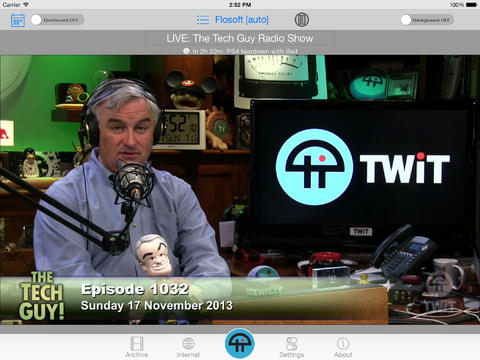
The TWiT and TWiTpad (iPad version) app by ShiftKey Software is currently on sale and is FREE to download for iOS devices, down from the previous price of USD$0.99.

The apps made by ShiftKey Software are known as the official and original apps made for the TWiT.TV Netcast website.

TWiT, if you don't know, is a web podcast website that offers many technology themed shows - live and on-demand - for free.

With the app, users can stream live video. Watch previously recorded shows. AirPlay shows. Stream to any Bluetooth device. Live chat. View the TWIT real-time calendar. And more...

In my opinion of the app, I felt that the user interface wasn't that great or polished. It looks very lazily put together. Like an old 90's webpage. I also experienced an app crash while trying to load video. In the iPhone version of the app I tested, shows aren't even presented nicely - they're just listed. until you choose a show.

I'd still recommend using the TWiT.TV website, or a podcast app.

You can download the TWiT and TWiTpad apps by ShiftKey Software from the iTunes App Store.

Featured Post

How To Update Your iPhone and iPad to iOS 10

iOS 10 is here! Here is how to update your device and get all those new features!  The first things you'll want to do before upda...