Showing posts with label updates. Show all posts

How To Update Your iPhone and iPad to iOS 10


iOS 10 is here! Here is how to update your device and get all those new features! 

The first things you'll want to do before updating your iPhone or iPad is to back it up! Why risk losing your data?! Things do sometimes go wrong and you may need to restore your iDevice from a backup. So... BACKUP FIRST!

If you have an iCloud backup that backs up everything, that's great, but if do you have a PC or Mac, I'd still strongly recommend backing up your device in iTunes.

Now, if you've never connected your device to iTunes before, check out this link to the Apple guide on backing up your device, first.

To backup your device and then update to the latest version of iOS, simply:


1. Plug your iPhone or iPad into your computer, then open the iTunes application.


2. Select your iPhone or iPad when it appears in iTunes.

If you want to backup your Health and Activity data, you will need to encrypt your backup.


3. Then, simply click, "Back Up Now" and wait for the backup to complete.

4. Next, you could update your device in iTunes by clicking "Check For Update", or you can eject your device and perform the update over the air!

On your iPhone or iPad, open the 'Setting' app.


Then tap 'General'.


Then 'Software Update', and follow the prompts.
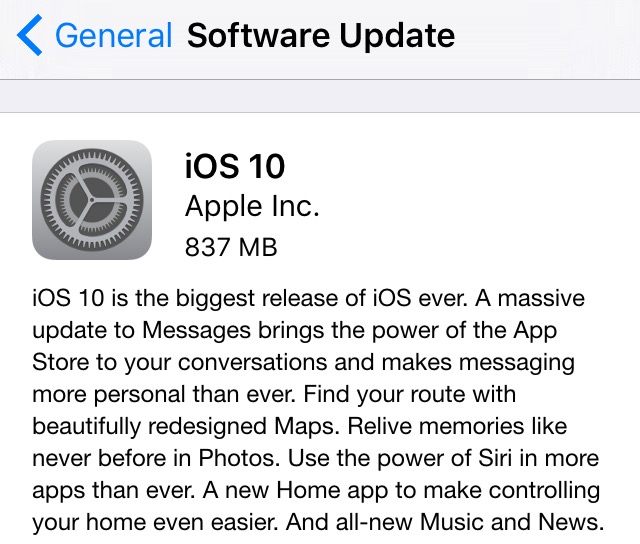


Your device will download the update, then begin to install. Wait for it to complete and then you are all set and will be running the latest version of iOS!


Apple's WWDC 2016 Keynote Event: How To Watch Online


Apple's WWDC (Worldwide Developers Conference) is nearly here! The annual event held by Apple in San Francisco, California, is the time of the year when Apple allows thousands of developers from all around the world to meet with Apple engineers and attend workshops.

Apple kick starts the event with a Keynote presentation that announces what to come from Apple later in the year, relating to software updates. 

This year, Apple is expected to unveil the latest (work-in-progress) updates to iOS, OS X, WatchOS and more... 

Apple will live stream the event on their website and on Apple TV, on June 13th at 10 a.m. PDT. 

If you'd like to watch the Keynote event with commentary from some of the best in tech, I'd recommend you check out TWiT.TV live coverage of the event. 

Instagram Revamps App With First Major Redesign In Years


Instagram is rolling out an update today which features a revamped icon and interface.

The app has gained a new simpler colorful icon and has ditched it's user interface's old color scheme for a 'white and black' one - to add more emphasis on the photos.


"Today we�re introducing a new look. You�ll see an updated icon and app design for Instagram. Inspired by the previous app icon, the new one represents a simpler camera and the rainbow lives on in gradient form. 

We�ve made improvements to how the Instagram app looks on the inside as well. The simpler design puts more focus on your photos and videos without changing how you navigate the app." - Instagram Blog.


There is also icon updates for Instagram's other apps; Layout, Boomerang and Hyperlapse.

What do you think of the new icon and interface colors? Do you give it a heart? Let us know in the comments.


> Instagram (version: 8.0) is available for download for free from the App Store


New Instagram App Update Removes Log Out Button

A new Instagram update has appeared in the App Store, version 7.19 on iOS. While the notes added with the update just talk about the previous added feature of video views, others fear that this update includes much worse - the dreaded new algorithm newsfeed that'll change your timeline from being chronological to what Instagram thinks you'll like best. Pretty much the same crap that Facebook does. 

While personally, I haven't seen the new algorithm take effect, there are some other noteworthy things about this Instagram update. 

Let's start with the good. Instagram has added a new line under usernames of those you don't follow in following and follower lists that'll tell you if anyone you know also follows this person. That a feature that can come in handy. 

Now onto the bad. This update could include the new algorithm, I'm not quite certain. Let me know in the comments if you've already seen the changes take effect. Although Instagram probably doesn't need an app update to change this. But here are some other reasons why you might not want to update so quickly.

It seems users are stuck logged in to their accounts! That's right, once you login and add an account, you can't log out without deleting the entire app off your device. You might say, 'but why would you want to log out?', yeah, true, but since Instagram has added the ability to have multiple accounts that are easily changeable from within the app, removing the log out button seems well let's just say, dumb. Also missing, along with the sign out of accounts buttons is the 'Clear search history' button. 

So, if you haven't already installed the latest Instagram update, maybe hold off for now?

UPDATE: The newest Instagram update (version 7.19.1) has fixed the issues mentioned in this post. 


How To Stop iOS OTA Update Once Started on iPhone or iPad

If you start an iOS over-the-air update, that is, a update straight from your iPhone or iPad, from Settings > Software Update, and then need to stop the update before it's done downloading - follow these steps: 

1. Open "Settings" app.  

2. Tap "General." 


3. Tap "Storage & iCloud Usage." 


4. Under Storage heading, tap "Manage Storage."  


5. A list will populate. Find "iOS X.X" on the list, and tap on it. 


6. Now, tap "Delete Update", then again on the pop-up menu to confirm. 

7. To re-download the update, go back to Settings > General > Software Update.    


First Look At Material Design on Google Chrome For Mac OS X


Google has been updating all their products to their new Material Design look for awhile now, and recently, the Material Design has been worked on for the Google Chrome web browser for Chrome OS, Windows, Linux and now Mac!  

To get a live look at the new Material Design makeover in progress, you'll need to install Google's test build version of Chrome, designed for developers and early adopters - Chrome Canary. Note: This program is NOT recommend for your everyday use - it is an experimental build and can completely break down. 


To switch on the new Material Design look, type into the address bar:  chrome://flags

Then find the title "Material design in the browser's top chrome". Then from the drop down menu, select "Material".   

At the moment on Mac, the main differences implemented are to the Navigation Bar with lighter and flatter colors and a new sharper edged shape on the tabs. There is also a new darker theme added to Incognito mode.  


Hating the new Material Look to Google Chrome? Don't worry, remember, this is a work-in-progress and far from the final look and version that will ship out at a later date in the stable Chrome release.

----

UPDATE (March 10th 2016): A progress report - here is what Material Design on Chrome Canary for Mac currently looks like:


Instagram Rolling Out Multiple Account Option


Instagram is finally adding the option to easily switch between and manage multiple accounts from within the app. This is handy for those who have a private and public profile, or for people who also manage an account for their business.

The multiple account feature is slowly rolling out to users, so if you don't have it yet, don't worry, you'll get access to its soon! In the meantime, make sure you have updated to the latest version of the app, from the App Store.

To see if you have the multiple account feature, and to add new accounts:

1. Open the Instagram app.

2. Tap on your profile (the last tab button on the bottom right).

3. Then tap the settings gear in the top right hand corner.

4. Scroll right down to the bottom and between clear history and log out will be a new option that says "Add Account".

5. Tap "Add Account" then login with the new Instagram account. You can add multiple accounts.

6. To switch between accounts, on your profile, at the top next to your username will be a downwards facing arrow. Tap the arrow to show your added accounts. Tap on the account you want to change too.


Apple Releases iOS 9.2 Update With Improvements & Bug Fixes

Apple has today released iOS 9.2 update for iPhone's, iPad's... Included in this update is various improvements and bug fixes including: improvements for Apple Music, a new Top Stories in News, and Mail Drop in Mail for large attachments. 

Before updating, remember to backup your iOS device to iTunes or at least iCloud! Then you can update over-the-air on Wi-Fi by going to: Setting > General > Software Update on your iOS device. Or you can also update through iTunes with your device connected to your computer.   

'Power Rangers Dash' Adds Megaforce Rangers To Game


If you had finished collecting Power Rangers in the iOS and Android game, 'Saban's Power Rangers Dash', you now have a few more to go back in and collect. In a recent update, the game has added the six 'Power Rangers Megaforce' Rangers!

Here's a tip to collect the new Megaforce Rangers - go the the store and buy with "Purchase by Point" for 100P each - then when asked which season you'd like the Ranger from, choose 'Megaforce'.

Power Rangers Dash now features nine different seasons of Power Rangers, including; Mighty Morphin (minus the White Tiger Ranger), Wild Force, S.P.D., Mystic Force, Operation Overdrive, RPM, Samurai, and the latest team, Power Rangers Dino Charge. Here's still hoping they add some of the other classic seasons like; Dino Thunder, Zeo, Time Force, and In Space - to name a few.  

Power Rangers Dash is FREE to download from the iOS App Store and Android Google Play Store. 


All The New Emoji's Added in iOS 9.1 & OS X 10.11.1


Apple released iOS 9.1 for iPhone and iPad and OS X 10.11.1 for Mac, yesterday. Included in the updates were over 150 new emoji characters! 

The new emoji's included: one of the most requested 'middle finger', a Slightly Smiling Face, Nerd Face, Face With Thermometer, Writing Hand, Robot Face, Unicorn Face, weather characters, Snowman, Popcorn, Champagne, Hot Dog, and many many more...  

All the new emoji's can be seen in the video above, by Emojipedia


WatchOS 2.0.1 Update Released For Apple Watch


Along with the new iOS 9.1 and OS X El Capitan 10.11.1 updates releases today, Apple also has released a software upgrade for the Apple Watch. 

The Apple Watch update includes fixes for software updates, battery performance, fixed issues for syncing iOS Calendar events to iPhone, issue that caused Digital Touch to send from email instead of phone number, and more... 

To update your Apple Watch, open the Apple Watch app on your iPhone, then on the 'My Watch' tab, tap 'General', 'Software Update'.


Apple Releases iOS 9.1 & OS X 10.11.1 Updates For iPhone, iPad's & Mac's

Apple today has released new updates today: iOS 9.1 for iPhone's and iPad's and OS X 10.11.1 for Mac's.

The iOS 9.1 update includes 150 new emoji characters including the most requested 'middle finger' emoji and some other ones like; a champagne bottle, unicorn head, champagne, robot head, thinking emoji, popcorn, hotdog, and more...

You can install the update by going to Settings > General > Software Update on your iPhone or iPad. Remember to have a backup first!  


On the Mac side, OS X El Capitan 10.11.1 features improvements for: installer reliability, compatibility with Microsoft Office 2016, VoiceOver reliability, support for 150 new emoji's and more...

You can update your system from the Mac App Store. Remember to backup your system first!  


Crossy Road Adds 5 New Halloween Characters


Crossy Road - Endless Arcade Hopper by HIPSTER WHALE, today was updated to include new Halloween themed characters!

There are 5 new 'spooky' characters included; Pumpkin, Skeleton, Witch, Mummy, and Scaredy Cat.

The new characters can be purchased with real money via a in-app purchase, or by winning them in the prize machine.

The Crossy Road Halloween update is now available in the app store.

Click here to view more Halloween themed app reviews.


Facebook Messenger Now On Apple Watch


Facebook Messenger is now available on Apple Watch! It was announced that Facebook would be making a Apple Watch App for Messenger at the September 2015 Apple Keynote Event.

Today's update now allows Messenger users to install the app on their Apple Watch running watchOS 2. After installing the Messenger update from the App Store, users will need to go to the Apple Watch app on their iPhone, find and tap the Messenger app in the list, then switch on "Show App on Apple Watch".

With Messenger on Apple Watch, users can now; view existing messages, reply to messages with preset text, your voice, Messenger Stickers, Your Location, or a Thumbs Up. You cannot, however, create a new conversation with someone who's not in your recent messages from Apple Watch.      

The Facebook Messenger [App Store Link] update for iOS 9 and watchOS 2 is now available in the App Store.  


YouTube Material Design Comes To iOS App Store


Google has today released its Material Design makeover for its YouTube app for iOS devices, months after the update was released for Android devices.

The new update brings a redesign that skewers away from the iOS 'look' of the previous version in favor of a Android look.

The redesign offers a new three part system: Home, Subscriptions, and Account, with the buttons in a huge red bar that unnecessarily takes up around one quarter of the screen (on iPhone).

Also included in the update is new in-app editing tool, making it easy for users to create and edit a video on the fly. There is also a new app icon which is the red YouTube play button logo on a white background, matching other Google apps on iOS.

The update is slowing roiling out to users in the App Store, even the redesign may not appear immediately after updating.

> YouTube for iOS is available for free from the App Store.


Apple Releases iOS 9.0.2 with Bug Fixes & Performance Enhancements


Apple has today released iOS 9.0.2. This minor update includes bug fixes and performance enhancements. 

This update contains bug fixes and improvements including: 
- Fixes an issue with the setting to turn on or off app cellular data usage
- Resolves an issue that prevented iMessage activation for some users
- Resolves an issue where an iCloud backup could be interrupted after starting a manual backup
- Fixes an issue where the screen could incorrectly rotate when receiving notifications
- Improves the stability of Podcasts

This is the second iOS 9 update released by Apple in the last two weeks. You can update your iOS device over-the-air on Wi-Fi by heading to: Settings > General > Software Update. 


Apple Watch 'watchOS 2' Is Here! So What's New?

It's so exciting, watchOS 2 for Apple Watch was released by Apple yesterday!  ...So... what's different? 

Well even though the number in the name is "2", it's really more of a 1.1. These are really all the features that should of been released in watchOS 1, but i guess they weren't ready. 

This watchOS update mostly adds a lot of little additions and upgrades.  

Here is some of the new features and changes to check out on your upgraded Apple Watch:

- New Colors options on Watch faces, including 'multicolor' for Modular face. 

- Support for apps to run natively on the Watch. 

- New Photo watch face.

- New Time-Lapse watch face.

- Third-party watch complications.  

- Add more default replies.

- You can now use multiple colors in Sketches.

- Option to keep the screen on longer when screen tapped. 

- Time-travel back or forward by turning the digital crown on watch face to see past or upcoming events or weather, etc. 

- Nightstand mode when Apple Watch is charging. 

- Apps now have ability to access features like Taptic Engine, Digital Crown, accelerometer, heart rate sensor, speaker and microphone. 

- Reply to emails.

- Add friends to circle directly on watch. You can also create more than one circle group.

- Public transport information on watch.

- Siri has been upgraded. You can now ask Siri to activate things like a specific workout, or to look up a word, or activate a glance.

- Activation Lock! Your Apple Watch is now locked to your iCloud Apple ID and password.   

- Activity Move ring now tracks in kilojoules instead of calories. 


Apple Releases WatchOS 2 Update for Apple Watch


Apple has today released the WatchOS 2 update for Apple Watch after delaying the release since last Wednesday (September 16th 2015) due to a 'bug' in the software.  

WatchOS 2 features small changes and upgrades to the Apple Watch software. Among the updates are: 

- New Time-Lapse and Photo watch faces.
- Third party watch complications. 
- Apps can natively run on the Apple Watch.
- See what's coming up on your schedule with Time Travel. 
- Nightstand mode. 
- and more...

To update your Apple Watch, open the Apple Watch app on your iPhone. On the My Watch tab click General, then Software Update. Note, you'll need to be connected to Wi-Fi, have your iPhone nearby, and your Apple Watch with a 50% or more charge - connected to its charger. The update is around 500mb in size. 

Read more about WatchOS 2 and the Apple Watch on Apple's website.

iOS 9 & watchOS 2 Release Day! How To Update Your iPhone, iPad, & Apple Watch


It's the day of the iOS 9 and watchOS 2 software updates! While it's not confirmed what time Apple will be releasing the updates, judging by previous years, iOS 9 will most likely be available at 10:00am PDT / 1:00pm EST.

iOS 9, the latest operating system for iPhone and iPad, features a new News app (for certain countries), improved Notes app, a new iCloud Drive app, new Siri suggestions and search page, new lower and uppercase Keyboard, ability to add content blockers for Safari, multitasking on iPad, and many, many more improvements to apps and iOS. 

*Update: TechCrunch reports that Apple are delaying the release of watchOS 2 due to a "...bug in development...". The update will not be released today, but will "...shortly."

The iOS 9 update can be installed via iTunes or via an over-the-air update - straight on your device: Settings > General > Software Update.   

But I do recommend either way before you install the update you BACKUP FIRST! You wouldn't want to lose all your important data like; photos, contacts, messages, and other app data in the event that something goes wrong. 

The best way to backup before a big update like this, is in iTunes, but a iCloud backup is also good to have. For more info on backing up iPhone and iPad to iTunes and iCloud, view the Apple Support guides on Backup.  

For watchOS 2, the update is done through the Apple Watch app on your iPhone: 
Apple Watch (app) > My Watch (tab) > General > Software Update

The Mac OS X 10.11 El Capitan update will be available on September 30th. 

View more about what's new in iOS 9 and in watchOS 2 on Apple's website. 

�PAC-MAN� Goes �Crossy Road� in Free Update - iOS Games


To celebrate the release of the new game, �PAC-MAN 256�, �Crossy Road - Endless Arcade Hopper� By HIPSTER WHALE has been updated today for iOS, with a new PAC-MAN mode!
�PAC-MAN comes to CROSSY ROAD as a completely free update. Don't forget to download PAC-MAN 256 by BANDAI NAMCO, Hipster Whale and 3 Sprockets. Available now.� 
The new PAC-MAN mode is a free in-app purchase.

The new mode sees PAC-MAN trying to cross the street with the Ghosts as the vehicles on the road. And of course the Glitch is there too!

The PAC-MAN mode is really cool, the best mode �Crossy Road� has offered yet. The level looks like a mix between PAC-MAN and something out of the movie TRON.

Check your App Store for the new �Crossy Road� update, now! And check out my previous quick review on �Pac-Man 256�, here.

> Download �Crossy Road� for free from the iTunes App Store.  


Featured Post

How To Update Your iPhone and iPad to iOS 10

iOS 10 is here! Here is how to update your device and get all those new features!  The first things you'll want to do before upda...